> For the complete documentation index, see [llms.txt](https://imbrace.gitbook.io/imbrace-documentation/llms.txt). Markdown versions of documentation pages are available by appending `.md` to page URLs; this page is available as [Markdown](https://imbrace.gitbook.io/imbrace-documentation/onboarding-guide/notifications.md).
# Notifications
The Notifications panel keeps you up to date on activity that needs your attention, such as new conversations, assignments, and team updates. Notifications are grouped into tabs so you can focus on one type at a time.
### Opening the Notifications panel
1. Click the **Notifications** (bell) icon in the left menu.
2. The Notifications panel opens on the right side of the screen.
## New Team Conversation (For Collaboration Team)
This notification alerts all team members when a new conversation is initiated, allowing them to join freely, or specifically notifies an invited member.
* When a collaboration team is invited to a conversation, all members will receive a new conversation notification in the notification centre.
* They can freely join the conversation.
* When a specific team member is invited, only the invitee will receive a new chatroom notification in the notification centre.
* Other members can see and freely join the conversation from the conversation list.
## New Assignment Notification from Data Board
This notification is sent to an assignee when a task is assigned, providing details about the task and a link to the assigned record in the Data Board.
* When a task is assigned, the assignee will receive an assignment notification.
* The notification will display the name of the user who assigned the task and the name of the assigned record in the Data Board.
* After clicking “**VIEW**”, it will link the user to the detailed modal of the assigned record.
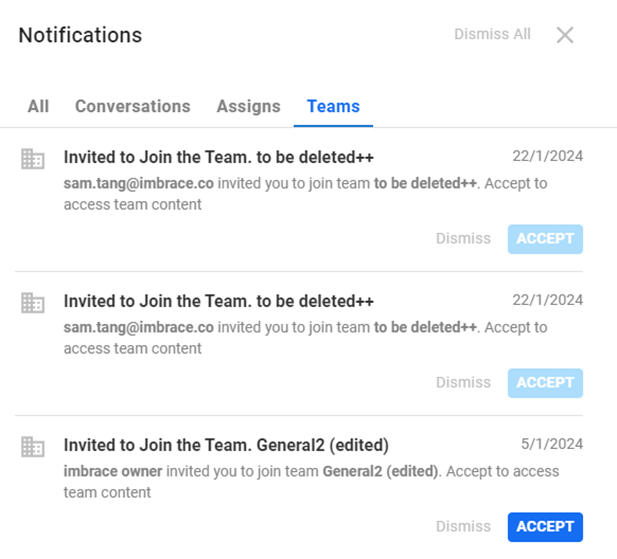
## New Team Invitation
This notification is sent to a member when they are invited to join a team, allowing them to accept the invitation and join the team with varying levels of access based on their role.
* When a member of an organization is invited to join a team, they will receive a new team notification.
* After accepting the invitation, the CTA button will be changed to “**ACCEPTED**”.
* The invitee can join the team to view the members of the team (if they are granted access as a Representative).
* The invitee can join the team to edit roles, invite other members, or remove members if they are granted as Team Admin.