> For the complete documentation index, see [llms.txt](https://imbrace.gitbook.io/imbrace-documentation/llms.txt). Markdown versions of documentation pages are available by appending `.md` to page URLs; this page is available as [Markdown](https://imbrace.gitbook.io/imbrace-documentation/onboarding-guide/types-of-notification.md).
# Types Of Notification
## New Team Conversation (For Collaboration Team)
This notification alerts all team members when a new conversation is initiated, allowing them to join freely, or specifically notifies an invited member.
* When a collaboration team is invited to a conversation, all members will receive a new conversation notification in the notification centre.
* They can freely join the conversation.
* When a specific team member is invited, only the invitee will receive a new chatroom notification in the notification centre.
* Other members can see and freely join the conversation from the conversation list.
## New Assignment Notification from Data Board
This notification is sent to an assignee when a task is assigned, providing details about the task and a link to the assigned record in the Data Board.
* When a task is assigned, the assignee will receive an assignment notification.
* The notification will display the name of the user who assigned the task and the name of the assigned record in the Data Board.
* After clicking “**VIEW**”, it will link the user to the detailed modal of the assigned record.
## New Team Invitation
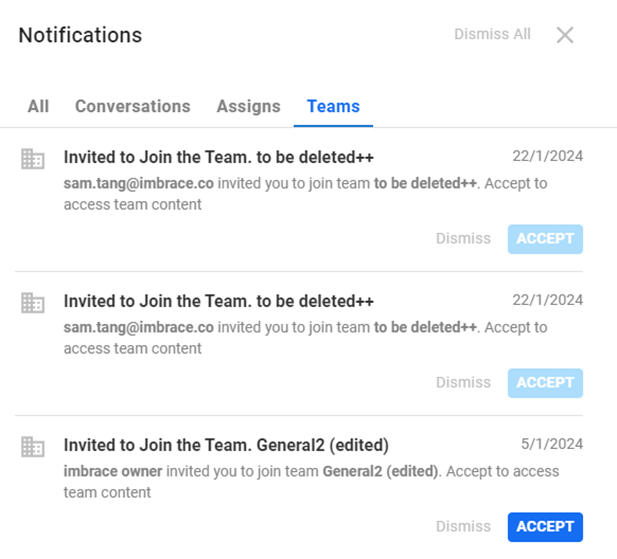
This notification is sent to a member when they are invited to join a team, allowing them to accept the invitation and join the team with varying levels of access based on their role.
* When a member of an organization is invited to join a team, they will receive a new team notification.
* After accepting the invitation, the CTA button will be changed to “**ACCEPTED**”.
* The invitee can join the team to view the members of the team (if they are granted access as a Representative).
* The invitee can join the team to edit roles, invite other members, or remove members if they are granted as Team Admin.